
How to Redeem Coupon Codes and Rewards Coupons
If you have received a coupon code or redeemed a rewards coupon, please follow the instructions below to apply it to your order.
Using a rewards coupon? If you have not yet redeemed your rewards points for a coupon code, please see our Rewards Program Redemption article for instructions on how to redeem your points and receive your code.
Coupon and Discount Restrictions
Please note that coupon codes and rewards coupons for discounts or free shipping cannot be combined with other coupon codes, discounts, promotions, or bulk discounts. Only one coupon code, discount, or promotion may be applied per order.
Exceptions:
Rewards coupons for a free gift may be combined with bulk discounts.
Our free shipping promotion on U.S. orders over $85 may be combined with bulk discounts, restrictions apply.
For additional information regarding discount restrictions, please review our Terms of Service.
Redeeming a Discount or Free Shipping Code
To apply a discount or free shipping code:
Copy your coupon or rewards code.
Proceed to checkout.
On the payment page, enter the code in the Discount Code field.
Click Apply.
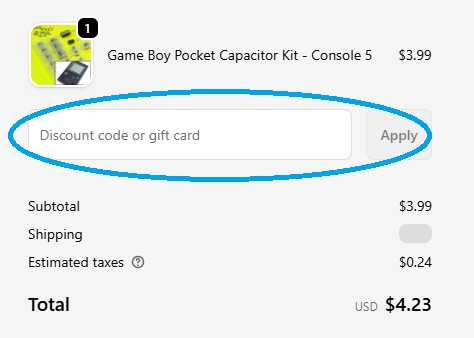
If the code is valid and all requirements have been met, the discount will be applied to your order total.
Redeeming a Free Gift Reward
To redeem a free gift reward:
Add the eligible free gift item to your cart.
Proceed to checkout.
Enter your rewards code in the Discount Code field on the payment page.
Click Apply.
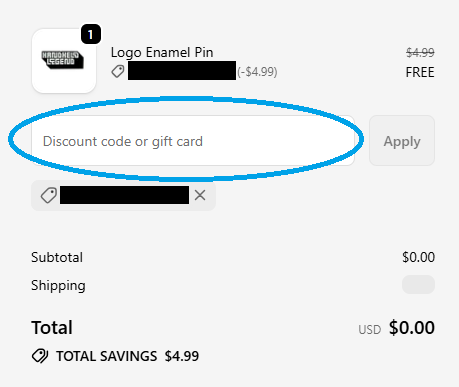
Once applied, the cost of the eligible gift item will be removed from your order total.
Important Notes
Coupon codes and rewards coupons must be entered during checkout before the order is submitted.
Discounts and promotions cannot be applied retroactively to orders that have already been placed.
Coupon codes may be subject to additional terms, conditions, or eligibility requirements.
Need Help?
If you have any questions about coupon codes, rewards coupons, or eligibility requirements, please contact us at support@handheldlegend.com.